
DNS, or domain name system, is the internet protocol that turns human readable website names (such as sordum.org) into machine readable numeric addresses. In some cases, you can improve browsing speed and/or improve your security by replacing the DNS provided by your internet service provider. DNS Jumper is a tool which makes this easy for you.
Why you should use DNS Jumper:
1. It can aid in accessing blocked websites
2. It can improve security by changing to more secure DNS servers.
3. It can help keep your children safe by blocking inappropriate websites (e.g. adult material) by selecting a Family Safe DNS server.
4. It can speed browsing by moving to a faster DNS server.
5. It can help To block unwanted advertisements.
6. Changing DNS servers manually can be done, but DNS Jumper greatly simplifies the process.
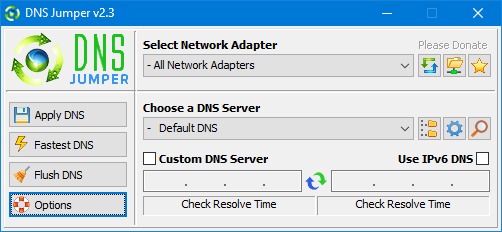
Versions after DNS Jumper 2.1 has some new and important features, such as Turbo Resolve which can apply the fastest DNS at startup. DNS Jumper is freeware, and portable (no installation needed).
What is new : (Thursday, 9 November 2023)
[FIXED] – On some systems, the “Selected Network Adapter” section changes automatically when the DNS is changed.
How to Change Your DNS Settings
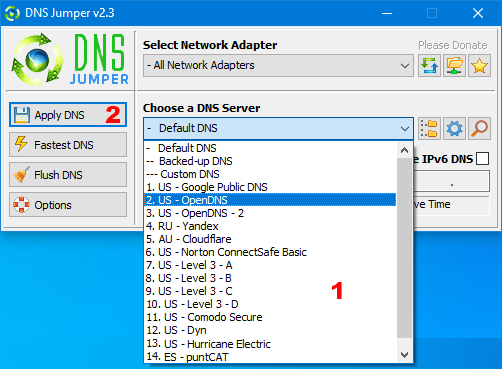
1. Under “Choose a DNS Server”, click the drop-down menu and select a server from the list
2. Click the “Apply DNS” button
(for IPv6, be sure to tick the IPv6 checkbox)
How to Restore Your DNS settings or use your ISP’s default DNS Again:
There are two ways to do this:
1. Click the “Quick Configuration” button (the star icon) and select from the list
2. Under “Choose a DNS Server”, open the drop-down menu and select “Default (or Restore) DNS” from the list, then click “Apply DNS”.
(for IPv6, be sure to tick the IPv6 checkbox)

NOTE: Security softwares like Avast or Malwarebytes can cause Very high resolve times,if you use one of them please add DnsJumper to Exclusion list. ZoneAlarm security software may block DNS Jumper’s Ping feature, Please configure ZoneAlarm to allow ping messages , explanation
Dns Jumper HELP section
- Dns Jumper v2.3 Main Features
- See Your Current DNS servers in Dns Jumper
- How to Change or Use Custom DNS Server Settings
- How to add a custom DNS server
- Get info about preferred and alternate DNS
- Backup or restore Dns settings
- Choose a Dns Group
- Find the fastest DNS
- Add or delete a DNS server
- Add or delete a DNS server Group
- Changing the Dns list order
- Starting DNS jumper on system startup
- Run the fastest Dns test at startup and apply it Automatically
- Dns Jumper’s Cmd parameters
- Add Your own Languge (create a translation)
- Version History
.
Note : With the DNS jumper, you only need to make the DNS change once, then you can close or delete the DNS jumper. The DNS jumper does not work in the background. Our DNS list is just a sample , Please don’t use unsecure DNS servers , we are not responsible for any illegality or damage. Until now DNS jumper has been downloaded more than 5.000.000 (five million) times (our server + Other web resources) THANKS FOR YOUR TRUST
Supported operating systems: Windows 11 , Windows 10 , Windows 8.1 , Windows 8 , Windows 7 , Windows Vista , Windows Xp – (x86 & x64)
Supported languages: English , Turkish , German , Italian , Russian , Japanese , Vietnamese , Swedish , Slovenian , Chinese (Simplified) , Chinese (Traditional) , French , Indonesian , Portuguese-BR , Portuguese-PT , Dutch , Polish , Spanish , Korean , Greek , Hungarian , Arabic , Persian , Croatian , Serbian , Hebrew , Czech , Ukrainian , Azerbaijani , Romanian , Georgian , Lithuanian , Bulgarian, Danish




Updated: Thursday, November 9, 2023
File : DnsJumper.exe
MD5 : 142c1cb2e06b3f3e231f99b7cc4a91b2
SHA1 : 8f0ecb34f6095e51ac4caa58fbef1d01e688a027
SHA-256 : 6fe6bac71a82a58abcb06b0df4a836116543302efe6e076402fa518dfa455baa




 Show My IP Address
 Google Translate
Все програмы от sordum + ето супер софт . зделан людьми и для людей. Обожаю все ваши програмки. Желаю успехов и процветания вашей команде. с уважением Yurii = Ukraine the Best
add DoH encryption, please.
The resolution test uses www.google.com as the default domain in the INI file and the selected DNS server. It simply shows how long it takes to obtain the IP address of the relevant domain. Thank you for your feedback. We have noted your request.
Feedback about DNS Jumper’s DNS Ping Testing
Hi,
I found that DNS Jumper measures DNS latency using an external domain (for example, Web Link …), which can cause inaccurate results for local connections.
I discovered that this behavior can be adjusted by editing the local configuration file — DnsJumper.ini — and changing the line:
ResolveDomainName=127.0.0.1
After applying this local setting, DNS Jumper performs ping and latency tests locally and the results correctly reflect real connection conditions.
It might be a good idea to either make this the default behavior or add a “Local Resolve Test” option in the UI.
Thanks for maintaining such a useful tool!
(Tested on version 24/25h2, Windows 10/11)
Muchas gracias, saludos desde la India.
como bajar lactancia y el ping
pls make this available to linux
Hi, DnsJumper does not ping the DNS address. It resolves a default domain (www. google. com) using the relevant DNS.
It reflects the time taken for resolution. The time between ping and resolution will be different.
In addition, there may be differences in tests due to conditions such as density in DNS.
In short, ping and resolution tests are different. We have noted down your request.
Hi! Thank you for this great tool , DNS Jumper is very useful and works well.
I just wanted to point out that the ping values shown in the program are often different from the ones I get when using the Windows ping command (like ping 8.8.8.8 in CMD).
I think DNS Jumper uses its own method to test latency, which may not give the same result as the system’s native ping.
It would be awesome if you could add an option to use the system’s built-in ping.exe for more accurate results, or let users choose between internal and external ping methods.
This small change could really help advanced users get more reliable measurements.
Thanks again and keep up the great work!
No
Is there an Android version?
Bonjour,
blocage virus potentiel sur windows 11.
merci.
Yes, you can use it on Windows 11.
IS it available DNS Jumper for Windows 11?
Thank for answer in advance:)
It is in our notes. We will probably add it to the new version, Thanks.
Please add secure DNS (DoH) section in Windows 11.
@Luis Gonzalez
Cleanbrowsing DNS is located in the Family & Safe group!
Web Link …