

Users with unrestricted Internet access find themselves constantly battling malware infections and at risk of information leakage. Downloading copyrighted material from the company’s network can expose the company to legal action. By blocking some websites greatly reduce this risk and protects accidental browsing of mature, explicit and sensitive sites. It can also help conserve bandwidth for mission critical applications, and keep those charges down.Restricting access to specific URLs may also improve productivity and help staying focused , this point is especially important for children who need to study.

Using software to block websites in order to control Internet access can be beneficial especially to businesses , schools that want to comply with child protection legislation and publicly accessible WiFi services that want to provide a family-friendly browsing environment and Home users.
What is New (Tuesday, May 19, 2026)
1.[ADDED] – /R parameter support (resets the list)
2.[ADDED] – Improvements were made in coding
What is URL Disabler and how to use it
URL Disabler is a Portable (it requires no installation) and freeware to simplify the URL blocking process for Google Chrome , Firefox Microsoft EDGE, Brave and Yandex users. The user can freely provide, modify, export and import the list of URLs to be blocked.
1. After download and Unzip it, please run Appropriate exe file (x64 or x86) then Type the URL of the web page you want to block into the URL field (1) and use plus button (Add to list) (2)

2. By default, the setting “Options – Save changes automatically” is checked, which means that when you add an URL to the software you don’t need to click the Apply Changes button. If “Automatically save changes” is not selected, use the “Apply changes” button to apply. Easily block any distracting or harmful website. You can click one of the browser icons at the bottom right to choose which browser to apply or unapply settings to.

Enabling the “Enable Whitelist” checkbox in the bottom left corner of the URL Disabler interface will make only the web pages listed in the interface accessible and block all others.

You can also choose the browser which the ban will be apply from the menu under options, by default all supported browsers are selected. Under the same menu you can use Password Properties to set the Password for the Application.

Under Examples menu; facebook.com, twitter.com, youtube.com URLs are given as examples. The export and import options are under the file menu, so you can easily reuse the list you created and backed up once.

URL Disabler also offers CMD support. (UrlDisabler.exe /?)
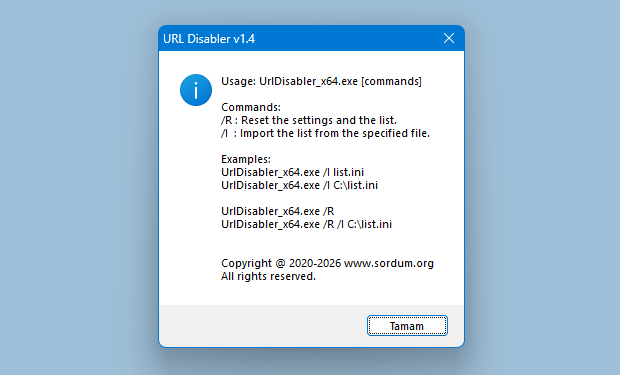
URL Disabler doesn’t use “%SystemRoot%\System32\drivers\etc\hosts” file method therefore resetting the Hosts file does not affect the blocking Rules. If you want to use hosts file Method for blocking web pages please try our “BlueLife Hosts Editor” software.
Note: If restarting browser does not apply the blocking Rules please log off and log in again (Very rare)
Supported languages: English, Turkish , German , French , Italian , Spanish , Russian , Hungarian , Hebrew , Polish , Japanese , Greek , Dutch (Nederlands), Vietnamese, Persian , Portuguese (Brasil) , Thai , Romanian , Chinese Simplified , Chinese Traditional, Arabic , Korean , Slovenian , Lithuanian
Supported Operating Systems: Windows 11 , Windows 10 , Windows 8.1 , Windows 8 , Windows 7
Supported Browsers: Google Chrome , Firefox, Chromium EDGE , Brave, Yandex

File: UrlDisabler_x64.exe │ Virustotal
MD5: 279c38e01ee053f78d59a773206f4d9f
SHA1: 168bf8972a21aacf489ca4bccbedbb28d767afe3
SHA-256: f3f6f1d46519106d44a57c59757080b19a872c05aa1fb7eb81734028bc018251
File: UrlDisabler.exe │ Virustotal
MD5: 9ad2b155d5c9c0e1cbc411ac42724262
SHA1: 94fd7fb0be022e5c79361074a9d059e087a5890a
SHA-256: f7da99a044fbb2a49307249e6748a86ad73a1b662c88917d24c5bc28285b1489




 Show My IP Address
 Google Translate
Hi
Command:
/I : Imports the list from the specified file.
UrlDisabler_x64.exe /I C:\MyList.ini
enable block -> it’s ok
if it were possible new command line
/D : Delete the list from the specified file.
UrlDisabler_x64.exe /D C:\MyList.ini
disable block
makes it easy to manage ALL school lab computers using Veyon software
I would be very grateful if it were possible to do this
Thank you
You can export the changes you made using the ‘URL Disabler’ feature by selecting ‘File > Export List’. You can then quickly load this file from the command prompt.
UrlDisabler_x64.exe /I C:\MyList.ini
I’m still here. Is it possible to enable or disable blocking list.ini using Command parameters? Thanks for everything.
Partially. For example :
Usage:
Command:
/I : Imports the list from the specified file.
Examples:
UrlDisabler.exe /I list.ini
UrlDisabler.exe /I C:\list.ini
supports Command parameters ?
This rule is determined by the browser. Please see the following examples.
Web Link …
Web Link …
Web Link …
The example is ‘file://*’ and I realize that it could work when the wildcard character ‘*’ is used alone. But it’s not working when I try to block files using ‘*.txt’ or website like ‘*.example.com’.
The program supports wildcard characters. The "Examples > Web-WhatsApp" example includes a wildcard character. If you are unable to use it, please contact us again and provide the example website name.
Plz consider this feature: I need to block a list of websites. Plz tell me or add or way to use wildcard characters. Thks so much.
Please support Quark
Need opera! Plz Opera ….
We already have such a software.
Web Link …
Why not use the host-file to make it "Hard" (with balls) inside WinNT *bg* and the programm only for direckt working block list.. like it is now, it need only extra code, like i guess, for the host-file with webadress 127.0.0.1 for make it permanent inside the WinNT and therewith for all Browser and compatible for all …
Best
To make this possible, the browser needs to support this change.
The blocked website is displayed as: This website has been blocked.
Can the message be changed, allowing users to customize the content of the blocked page, such as images and text?
(禁止的网站显示:该网站已屏蔽。
能否更改提示语,即可以自由定制屏蔽时页面的内容,如图片,提示文字等。)
You can use Firewall App Blocker (Fab)
Web Link …
How to block any program from accessing the internet (example: Microsoft Store)
(herhangibir programın internete çıkışını nasıl engelleriz örnek microsoft store)