

On average, teens spend nine hours a day using media for entertainment – that’s more time than they spend sleeping and far more time than they spend studying. This is why more and more families are looking into ways to block internet access temporarily.But as we all know, it can be hard to give up things that are bad for us, we get home from work but continue to check email, waste time on social networking sites, or stare blankly at a computer for such reason We may want to turn the internet off temporarily.
What is New (Monday, January 26, 2026)
1.[FIXED] – “/E” command is deleting outbound IP rules from firewall.
2.[FIXED] – Both the text and the GUI are very small.
3.[FIXED] – The program window does not remember its position when opened again.
4.[ADDED] – IPv6 DNS blocking feature
5.[ADDED] – The coding has been improved.(Include many fixes)
The reasons to Completely Disable Internet are varied and many , for example :
1. To prevent programs from calling home or from updating.
2. To prevent your computer from receiving email or social media alerts etc. you could also use it to avoid distractions during work.
3. Disconnecting from the internet can limit the impact of the malware it is a security technique known as an “air gap”. By separating the computer from any network makes it more secure.
4. Internet access can be harmful if employees spend too much time browsing the Internet instead of performing their regular duties…
Technically, you can control internet by running netsh interface command in command prompt window to enable and disable the network connection that has the internet access. But This method can be easily circumvented and does not offer a guarantee. If you want to disable Internet connectivity for some time or on some events, you can easily do it with Net Disabler it is a small portable Freeware tool, you can use it to quickly turn the Internet off or on again.
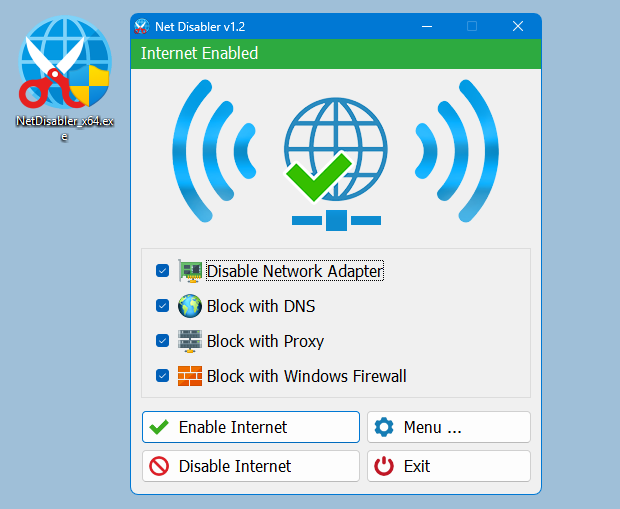
The application displays the current status of the Internet connection in the interface above is on status and below is off
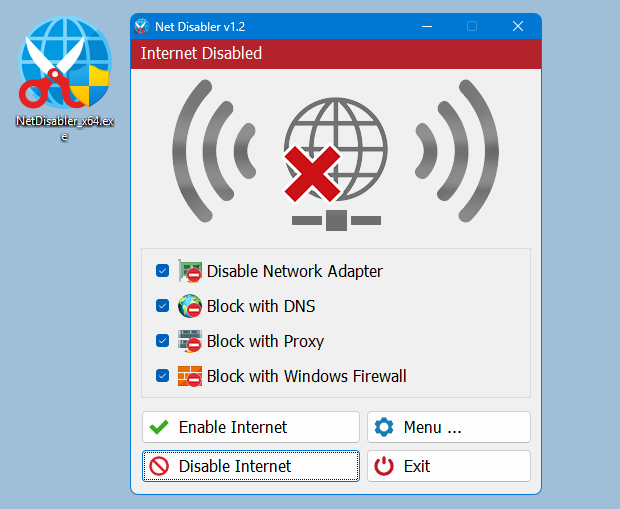
Usage is very simple,there are 4 Internet blocking methods yo can choose one/all of them or you can use a combination.
1. Disable Network Adapter
2. Block with DNS
4. Block with Proxy
3. Block with Windows firewall
After selecting use Disable Internet button to complete the Operation, to bring the Internet back just use Enable Internet button. Under menu button you can choose your Network Adapers , you can set a password , open Device Manager, Network Connections or Firewall settings
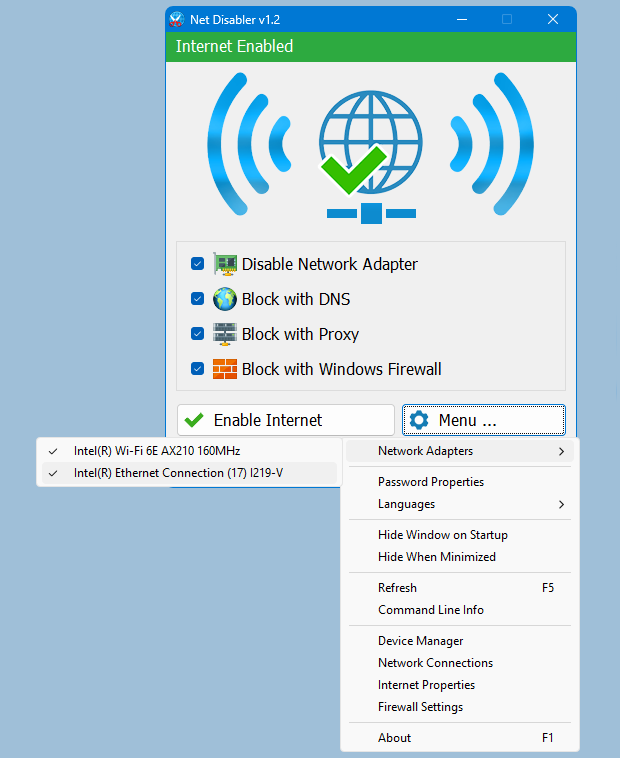
NOTE: If one of the devices is disabled , the status indicator will be off
If you are looking for a tool that allows you to quickly cut off the Internet connection, then “Net Disabler” is offering exactly what you are looking for.
– NetDisabler does not install any service
– NetDisabler Offer 4 Internet blocking methods
– NetDisabler has a password protection feature
– NetDisabler is Portable and freeware Application
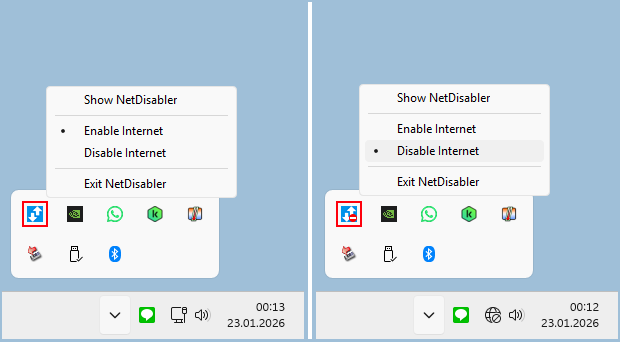
To enable or disable internet via taskbar , right click on the Net Disabler taskbar icon and choose appropriate option.
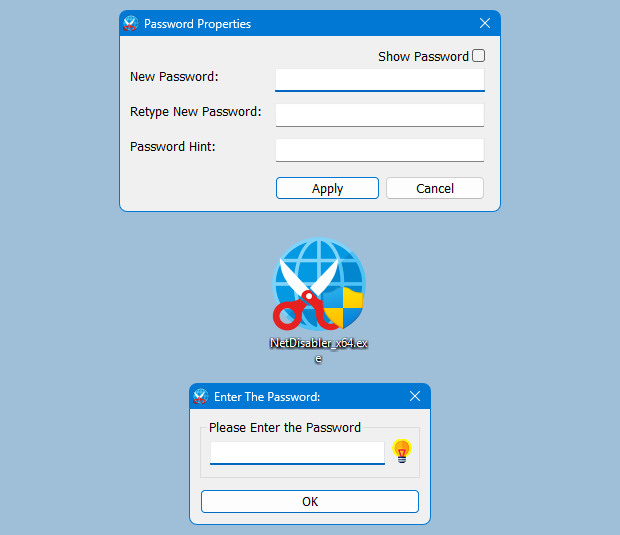
If you want to make sure no one will use the internet you can set a password to protect your settings
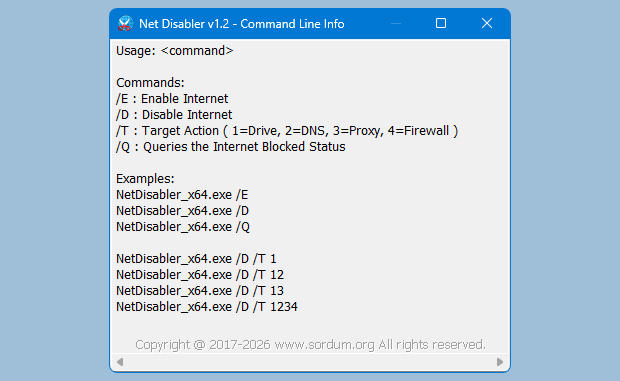
Net Disabler supports Cmd parameters to list all available parameters use the “Command Line Info” under the Menu button or In a command prompt, running “NetDisabler.exe /?” (no quotes) will list all available parameters. See also the screenshot below.
Supported Operating Systems: Windows 11 , Windows 10 , Windows 8.1 , Windows 8 , Windows 7 , Windows Vista – Windows XP (except Block with Windows Firewall feature) – both x86 and x64
Supported languages: English, Turkish, German, Russian, French, Polish, Spanish, Czech, Korean, Slovenian, Chinese (Simplified), Chinese (Traditional), Hebrew, Italian, Hungarian, Greek, Swedish, Arabic, Thai, Romanian, Portuguese (Brazilian), Japanese, Persian, Vietnamese, Bulgarian, Dutch (Nederlands), Ukrainian, Slovak, Lithuanian

File : NetDisabler_x64.exe │ Virustotal
MD5 : b4cc6e6e94e5f21cdd53aa62c6e343d4
SHA1 : 2f78da7cf1041335a161ec6c1cb74939b65dc95d
SHA-256 : 267b5deaabf18fbc7058263a8c96553d3c061d967eb939f9e9d0aa2a8f9bbf1a
File : NetDisabler.exe │ Virustotal
MD5 : 9a05b0a71f39a22e13e5df2a4f4fd1d8
SHA1 : 3aa746344ed8bc527dec15e64e10f0f53cad801d
SHA-256 : a501e4dacc2a26215e8841e935c0e382959edfe27e8a88d862975ea2373548ab




 Show My IP Address
 Google Translate
Use the following one
Web Link …
Are there any features that can only be accessed by specific sites?
No but we have noted it down.
Can NetDisabler work with the windows display/power settings to disconnect network access when the system is not in use and re-establish when the system re-activates?
We have noted it down , Thank you
תודה על תוכנה
נתקלתי בבעיה קטנה שכשעושים פתור בעיות של רשת הוא פותח את הרשת הגם שחסמתי עם שלשת סוגי החסימות
It disables the whole network
Will this allow me to turn off internet but not LAN, meaning no access to the internet but still connected to other computers in the network.
Hi Keith LaKey, we tested it with the latest windows 10 and there is no such Problem, Your antivirus software or something else may have caused this.
I had to manually regain access to the Network.
I’ve used it several times before. Whit no problems, but to day I unchecked the boxes, and couldn’t connect to web sites. (I could Ping OK). Windows troubleshooter said there was a DNS problem. I checked my NIC IP4 config, and my DNS was set for 127.0.0.1. I set it back to automatic and regained access. It looks like the tool "thought" it re-enabled DNS, but was not successful. Perhaps you need to code in verification.
Seems to work great for basic use.
I don’t think you can override this tool very simple,Thanks for your comment
Its very simple to override this tool. But this is good for short time protection…
We have checked it again , There is no problem with the parameter.Net Disabler need admin privileges, if it not get this Privileges , may cause some errors but we have not received such an error notification so far.
After a restart, the network adapter cannot be activated with the command line command NetDisabler_x64.exe / E.
where to download,.,,,,verry irriant they try first that you without willing download other software
Thanks for your feedback.