

On average, teens spend nine hours a day using media for entertainment – that’s more time than they spend sleeping and far more time than they spend studying. This is why more and more families are looking into ways to block internet access temporarily.But as we all know, it can be hard to give up things that are bad for us, we get home from work but continue to check email, waste time on social networking sites, or stare blankly at a computer for such reason We may want to turn the internet off temporarily.
What is New (Monday, January 26, 2026)
1.[FIXED] – “/E” command is deleting outbound IP rules from firewall.
2.[FIXED] – Both the text and the GUI are very small.
3.[FIXED] – The program window does not remember its position when opened again.
4.[ADDED] – IPv6 DNS blocking feature
5.[ADDED] – The coding has been improved.(Include many fixes)
The reasons to Completely Disable Internet are varied and many , for example :
1. To prevent programs from calling home or from updating.
2. To prevent your computer from receiving email or social media alerts etc. you could also use it to avoid distractions during work.
3. Disconnecting from the internet can limit the impact of the malware it is a security technique known as an “air gap”. By separating the computer from any network makes it more secure.
4. Internet access can be harmful if employees spend too much time browsing the Internet instead of performing their regular duties…
Technically, you can control internet by running netsh interface command in command prompt window to enable and disable the network connection that has the internet access. But This method can be easily circumvented and does not offer a guarantee. If you want to disable Internet connectivity for some time or on some events, you can easily do it with Net Disabler it is a small portable Freeware tool, you can use it to quickly turn the Internet off or on again.
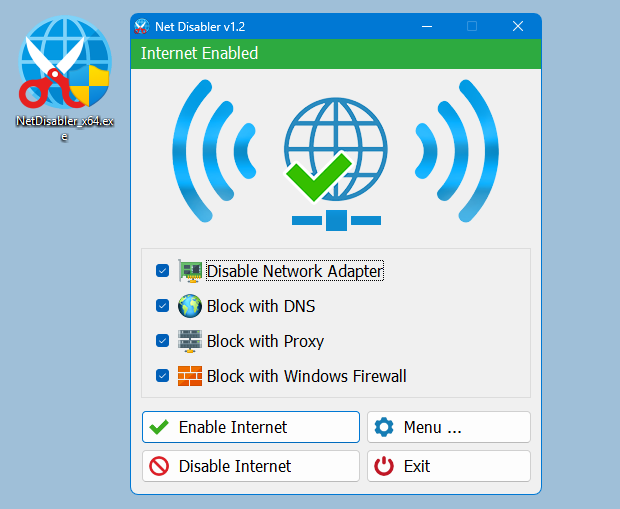
The application displays the current status of the Internet connection in the interface above is on status and below is off
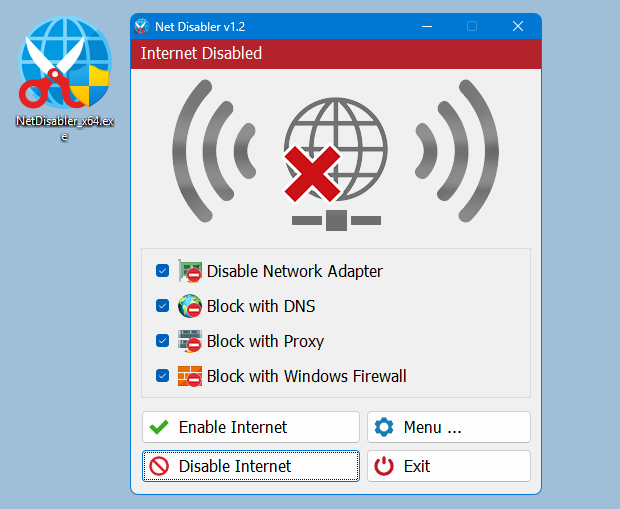
Usage is very simple,there are 4 Internet blocking methods yo can choose one/all of them or you can use a combination.
1. Disable Network Adapter
2. Block with DNS
4. Block with Proxy
3. Block with Windows firewall
After selecting use Disable Internet button to complete the Operation, to bring the Internet back just use Enable Internet button. Under menu button you can choose your Network Adapers , you can set a password , open Device Manager, Network Connections or Firewall settings
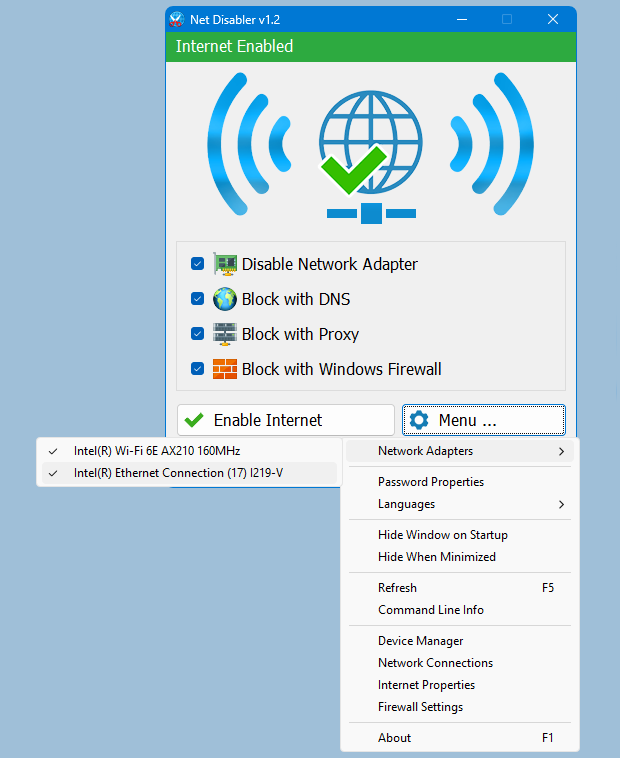
NOTE: If one of the devices is disabled , the status indicator will be off
If you are looking for a tool that allows you to quickly cut off the Internet connection, then “Net Disabler” is offering exactly what you are looking for.
– NetDisabler does not install any service
– NetDisabler Offer 4 Internet blocking methods
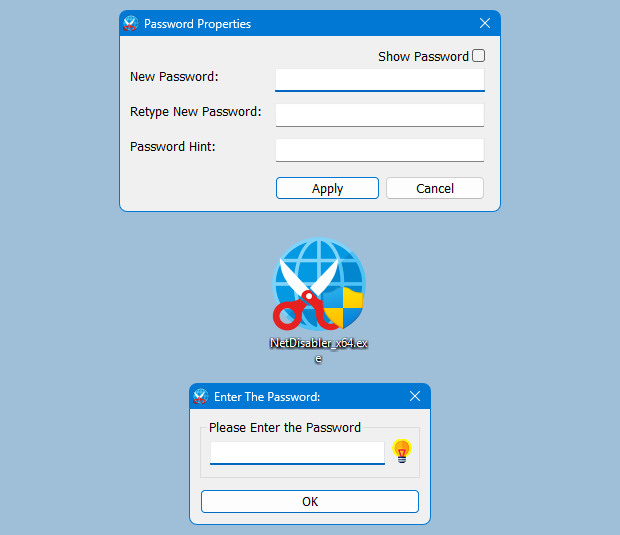
– NetDisabler has a password protection feature
– NetDisabler is Portable and freeware Application
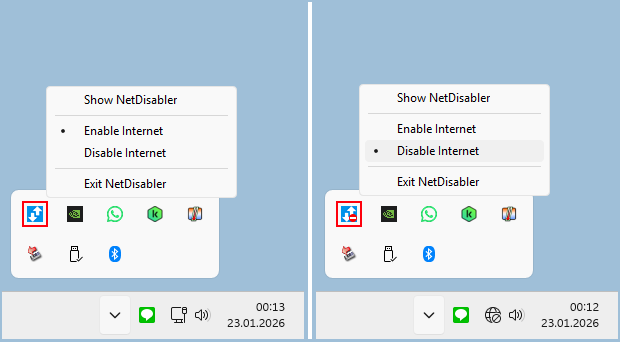
To enable or disable internet via taskbar , right click on the Net Disabler taskbar icon and choose appropriate option.
If you want to make sure no one will use the internet you can set a password to protect your settings
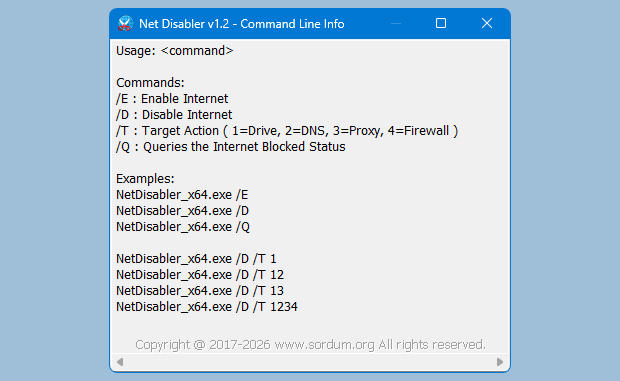
Net Disabler supports Cmd parameters to list all available parameters use the “Command Line Info” under the Menu button or In a command prompt, running “NetDisabler.exe /?” (no quotes) will list all available parameters. See also the screenshot below.
Supported Operating Systems: Windows 11 , Windows 10 , Windows 8.1 , Windows 8 , Windows 7 , Windows Vista – Windows XP (except Block with Windows Firewall feature) – both x86 and x64
Supported languages: English, Turkish, German, Russian, French, Polish, Spanish, Czech, Korean, Slovenian, Chinese (Simplified), Chinese (Traditional), Hebrew, Italian, Hungarian, Greek, Swedish, Arabic, Thai, Romanian, Portuguese (Brazilian), Japanese, Persian, Vietnamese, Bulgarian, Dutch (Nederlands), Ukrainian, Slovak, Lithuanian

File : NetDisabler_x64.exe │ Virustotal
MD5 : b4cc6e6e94e5f21cdd53aa62c6e343d4
SHA1 : 2f78da7cf1041335a161ec6c1cb74939b65dc95d
SHA-256 : 267b5deaabf18fbc7058263a8c96553d3c061d967eb939f9e9d0aa2a8f9bbf1a
File : NetDisabler.exe │ Virustotal
MD5 : 9a05b0a71f39a22e13e5df2a4f4fd1d8
SHA1 : 3aa746344ed8bc527dec15e64e10f0f53cad801d
SHA-256 : a501e4dacc2a26215e8841e935c0e382959edfe27e8a88d862975ea2373548ab




 Show My IP Address
 Google Translate
Aww, it finally works. Thanks for ur kind support <3
WordPress corrupts characters, please check them and correct , script added as txt file , please download it
It isn’t working, when I try run it (run from schedule and run by clicking the file?)
Web Link …
Hi, Please create a Batch file and then add it to the Task Scheduler or for better solution ; Create the following Vbscript next to NetDisabler_x64.exe and add it to the task scheduler manually or with Auto Start Tool 1.1
Script txt file :
Download
I even try "Run with highest privileges" but still no hope. Here is my configs:
Web Link …
Am I doing wrong or this app doesn’t work with "Task Scheduler" (the default one). In the Action tab, I set:
1. Action: "Start a program"
2. Program/script: C:\PATH\NetDisabler.exe (I check the path, it’s correct)
3. Add arguments: "/D"
And when I try to run in manually, it just doesn’t work (Though it does work when I run the following: "C:\PATH\NetDisabler.exe /D" in powershell)
Please try to use it like this
@Echo Off
for /f "tokens=*" %%q in ('"%~dp0\NetDisabler_x64.exe" /Q') do set qRESULT=%%q
Echo Query: %qRESULT%
pause
Hello,
What do we supposed to see with the /Q switch?
It says that it will return the app status, but can not see anything…
By the way this is an awsome app!
Regards,
John
Thanks for your Comment, We have tested it. The problem occurs because Net Disabler is running with administrator privilege but this is valid for different programs which are running with administrator privileges. To solve the problem, you can run FastStone Capture with administrator privileges.
strange,only just tried on win10
whenever the program is visible on the screen on or off, the very useful printscreen program faststone capture also the latest build , loses its capacity to use the hotkey printscreen for making full screen pnintscreens
,the program faststone capture does NOT lose its capacity to make printscreens,if i use the tray menu of the program it still makes printscreen of full screen which is printscreen hotkey but using the printscreen key to make printscreen of the window is very useful without having to go into the tray menu
when netdisabler screen is closed all returns to normal for faststone capture
If you want to hide Program interface on startup , select the Hide Window on Startup option under the Menu button.Programs that require admin authority do not start properly at system startup. For this reason, you can create a simple task that asks for admin authority using the task scheduler.You can open the task scheduler by opening the run window with the Win + R keyboard shortcut and giving the "taskschd.msc" command.Then, after creating a simple task with the Create Basic Task option from the action menu, you need to enter the task properties and mark the Run with the highest privileges option. Please follow the following instructions ;
Web Link …
hi can I install it so it loads with windows and it remembers enabled or disabled state? also the tray is not password protected I think. Thank you
On shared computers ,Next user can easily Close Airplane mode. (Was Just an example)
If only a simple connection cut off wouldn’t just clicking on Airplane mode do it?
add timer for automatic activation.
Could you please watch this video ?
Web Link …
bonjour
merci pour votre soft net disabler, très utile
2 suggestions rendre son icône en zone notification cliquable ( connecte vert / déconnecte rouge)
ou au moins permettre d’épingler la fenêtre du programme en premier plan pour pouvoir couper internet immédiatement
merci d’avance