

On average, teens spend nine hours a day using media for entertainment – that’s more time than they spend sleeping and far more time than they spend studying. This is why more and more families are looking into ways to block internet access temporarily.But as we all know, it can be hard to give up things that are bad for us, we get home from work but continue to check email, waste time on social networking sites, or stare blankly at a computer for such reason We may want to turn the internet off temporarily.
What is New (Monday, January 26, 2026)
1.[FIXED] – “/E” command is deleting outbound IP rules from firewall.
2.[FIXED] – Both the text and the GUI are very small.
3.[FIXED] – The program window does not remember its position when opened again.
4.[ADDED] – IPv6 DNS blocking feature
5.[ADDED] – The coding has been improved.(Include many fixes)
The reasons to Completely Disable Internet are varied and many , for example :
1. To prevent programs from calling home or from updating.
2. To prevent your computer from receiving email or social media alerts etc. you could also use it to avoid distractions during work.
3. Disconnecting from the internet can limit the impact of the malware it is a security technique known as an “air gap”. By separating the computer from any network makes it more secure.
4. Internet access can be harmful if employees spend too much time browsing the Internet instead of performing their regular duties…
Technically, you can control internet by running netsh interface command in command prompt window to enable and disable the network connection that has the internet access. But This method can be easily circumvented and does not offer a guarantee. If you want to disable Internet connectivity for some time or on some events, you can easily do it with Net Disabler it is a small portable Freeware tool, you can use it to quickly turn the Internet off or on again.
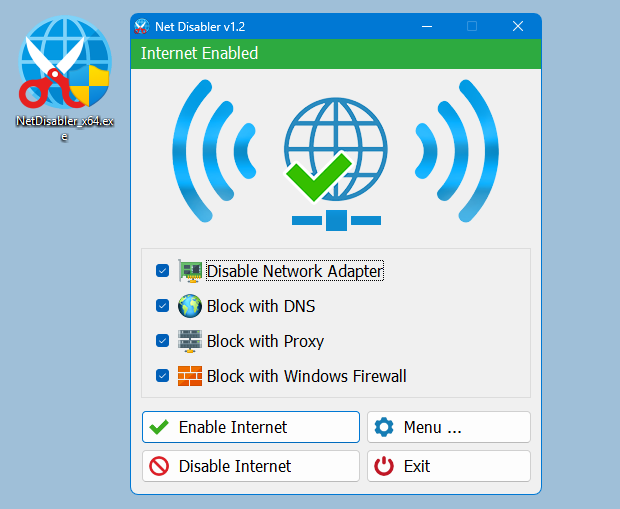
The application displays the current status of the Internet connection in the interface above is on status and below is off
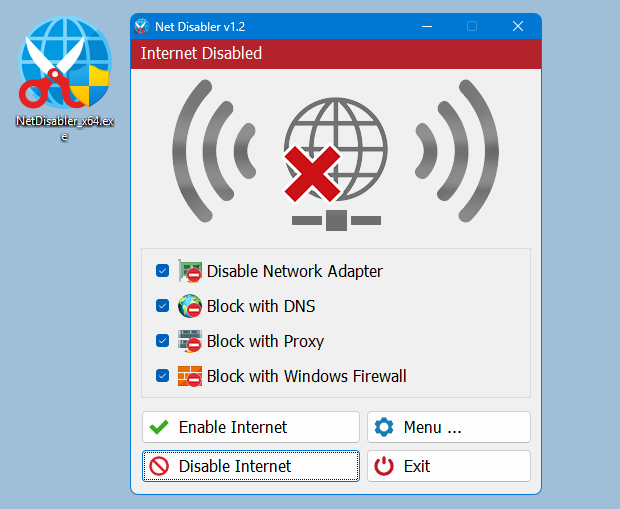
Usage is very simple,there are 4 Internet blocking methods yo can choose one/all of them or you can use a combination.
1. Disable Network Adapter
2. Block with DNS
4. Block with Proxy
3. Block with Windows firewall
After selecting use Disable Internet button to complete the Operation, to bring the Internet back just use Enable Internet button. Under menu button you can choose your Network Adapers , you can set a password , open Device Manager, Network Connections or Firewall settings
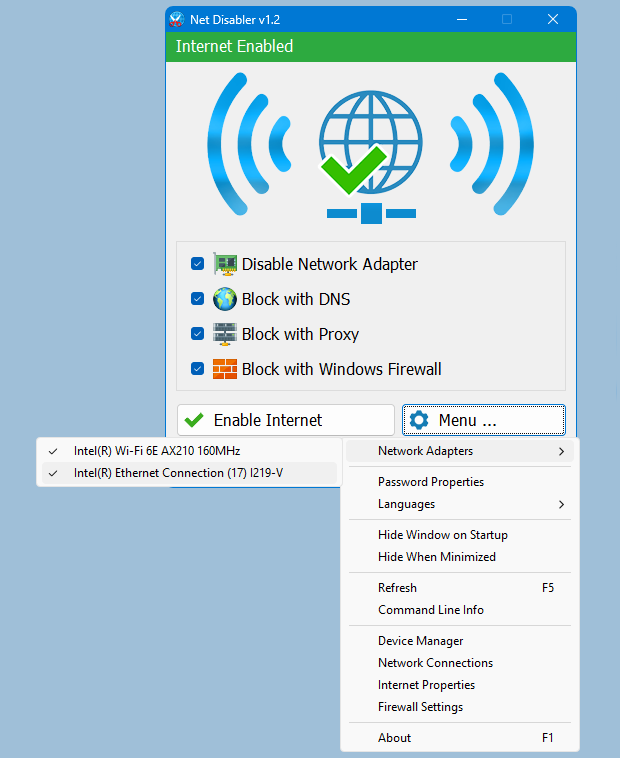
NOTE: If one of the devices is disabled , the status indicator will be off
If you are looking for a tool that allows you to quickly cut off the Internet connection, then “Net Disabler” is offering exactly what you are looking for.
– NetDisabler does not install any service
– NetDisabler Offer 4 Internet blocking methods
– NetDisabler has a password protection feature
– NetDisabler is Portable and freeware Application
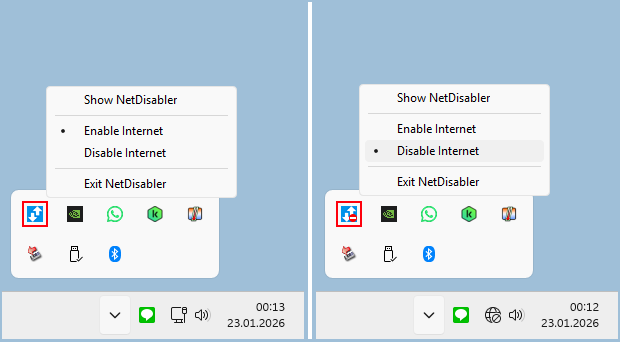
To enable or disable internet via taskbar , right click on the Net Disabler taskbar icon and choose appropriate option.
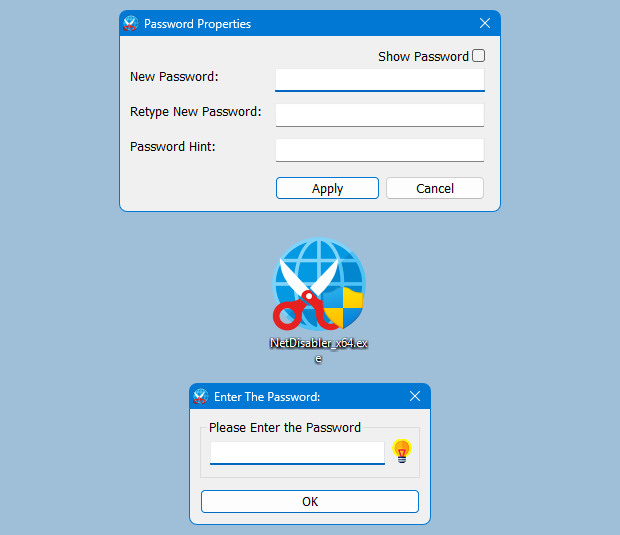
If you want to make sure no one will use the internet you can set a password to protect your settings
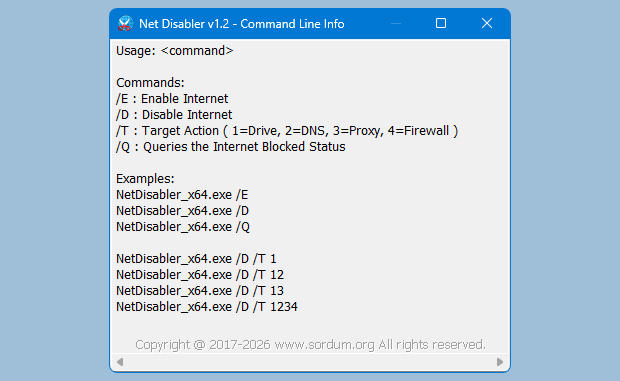
Net Disabler supports Cmd parameters to list all available parameters use the “Command Line Info” under the Menu button or In a command prompt, running “NetDisabler.exe /?” (no quotes) will list all available parameters. See also the screenshot below.
Supported Operating Systems: Windows 11 , Windows 10 , Windows 8.1 , Windows 8 , Windows 7 , Windows Vista – Windows XP (except Block with Windows Firewall feature) – both x86 and x64
Supported languages: English, Turkish, German, Russian, French, Polish, Spanish, Czech, Korean, Slovenian, Chinese (Simplified), Chinese (Traditional), Hebrew, Italian, Hungarian, Greek, Swedish, Arabic, Thai, Romanian, Portuguese (Brazilian), Japanese, Persian, Vietnamese, Bulgarian, Dutch (Nederlands), Ukrainian, Slovak, Lithuanian

File : NetDisabler_x64.exe │ Virustotal
MD5 : b4cc6e6e94e5f21cdd53aa62c6e343d4
SHA1 : 2f78da7cf1041335a161ec6c1cb74939b65dc95d
SHA-256 : 267b5deaabf18fbc7058263a8c96553d3c061d967eb939f9e9d0aa2a8f9bbf1a
File : NetDisabler.exe │ Virustotal
MD5 : 9a05b0a71f39a22e13e5df2a4f4fd1d8
SHA1 : 3aa746344ed8bc527dec15e64e10f0f53cad801d
SHA-256 : a501e4dacc2a26215e8841e935c0e382959edfe27e8a88d862975ea2373548ab




 Show My IP Address
 Google Translate
Hola, estaría genial que el programa tenga una franja horaria programable para que corte y reactive internet en un horario específico o en un timer; durante el timer, esté internet deshabilitada.
make app to block remote access remote assistant so no one able to connect our pc
Hi, the text size in the previous version was 10. We have changed it to 12 in this version. We have noted your request. Thank you.
Thank you very much for v1.2.
Is it possible, please, to make the UI text size a little bit smaller.
It was 8 in v1.1
It is 12 in v1.2
Maybe 10 it’s a good size.
Or to add a scale size in Menu:
– small = 8 (v1.1)
– medium = 10
– large = 12 (v1.2).
Thank you
Fixed thank you
If I have in windows firewall an outbound rule using IP, the program reports Internet Disabled (red).
If I use NetDisabler_x64.exe" /E the program is deleting IP rules from firewall.
Please fix this please, so no rules in firewall to be deleted when enable internet uring NetDisabler_x64.exe" /E.
Thank you
Que hago si olvide la clave que le puse?
Net Disabler supports parameters. You can use Task Scheduler with the Net Disabler parameters to block or enable the internet at any time interval. If more than one person uses the computer, you can create limited accounts for them. Please use ; Menu – Password properties
It would be good if there is a scheduler. So that the internet block starts at a certain moment and is released at a certain time.
Btw what happens if the port. app is deleted by a user? How can I prevent another user from tampering with or disabling your app?
You can view the Internet Blocked status information by running the following sample batch script as an administrator.
@Echo Off
for /f "tokens=*" %%q in ('"%~dp0\NetDisabler_x64.exe" /Q') do set qRESULT=%%q
Echo Query: %qRESULT%
pause
What exactly does /Q do? Whether or not my connection is enabled or disabled, the program is running or not, running it from the command line produces no output, nor does it open the GUI, unlike the /? switch. I’ve been using it for years and all the other switches work great, but this one remains a mystery. Thanks!
You’re welcome