

Windows’ built-in “Run-As” command allows you to launch a program as a different user account than the one currently active, However, runas.exe cannot be fully automated as it requires that the user typein the password for the alternate account. RunAsTool is portable freeware which allows standard users to run a specific program with administrator privileges without the need to enter the administrator password. This allows you to provide standard (non-admin) users with access to programs that require admin rights.
Some programs may not run correctly under a restricted account due to missing administrator rights. Therefore, many users are given administrator accounts, which makes the system more vulnerable to malware, viruses and other security risks. With RunAsTool, you can fix this. The login information for the application like username and password are read from an encrypted file.
RunAsTool v1.6 – What’s New – (Wednesday, July 1, 2026)
1. [ADDED] – Password security has been enhanced.
2. [ADDED] – Domain support.
3. [ADDED] – The method was modified to work in portable mode.
4. [ADDED] – verifying the hash before running.
5. [ADDED] – prompting for a password before running.
6. [ADDED] – Option to inherit variables.
7. [REMOVED] – Support for Import Cmd parameters.
8. [REMOVED] – Support for XP.
9. [ADDED] – A large portion of the program has been rewritten.
How to use
With RunAsTool there is no need to use a CMD prompt or any parameter in order to allow a standard user to run a program with admin rights. Just download, extract, and launch RunAsTool. Note: Problems may occur if RunAsTool is moved to the desktop and run from there. Both the administrator and users who will use the program must have access to the relevant folder. Therefore, running the program from a location to which you have access permissions will help prevent certain issues.
1) Administrators In standard user account:
Launch RunAsTool and choose an admin account (if there are more than one) and type in the associated admin password.
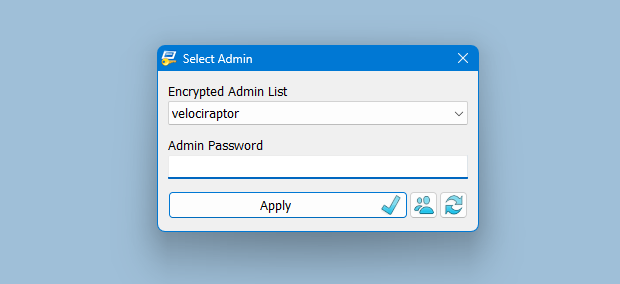
RunAsTool has two user interfaces (UI). One for administrator accounts and one for standard users. (Standard users aren’t able to use the admin UI). In the admin UI, you can easily drag and drop any program(s) into the UI in order to give it admin privileges. Standard users can also create application shortcuts.
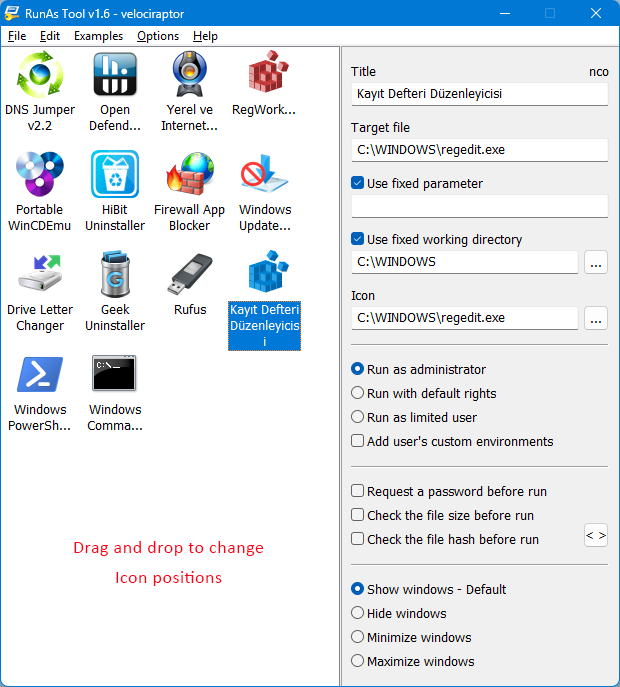
To change the places of the icons in the interface, simply drag them on each other. RunAsTool has several useful options. For example, “Run with default rights”, “Run as limited user”, as well as the ability to show, hide, minimize, or maximize the launched window(s). As a security check, administrators can use “check the file size before run” feature. If a restricted user attempts to rename another program in order to run it with admin rights (a.k.a. “spoofing”), this option will prevent the user from doing so.
2) Administrators In Administrator user account:
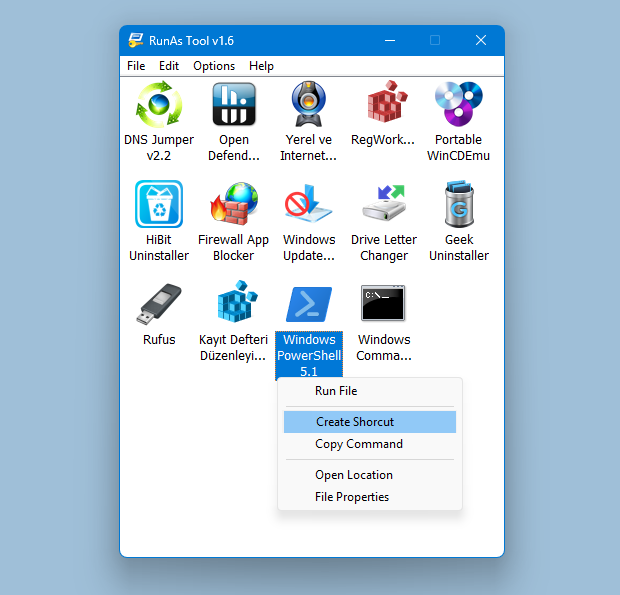
Admins can easily add program(s), then right click it/them and create a shortcut on the standard user’s desktop.
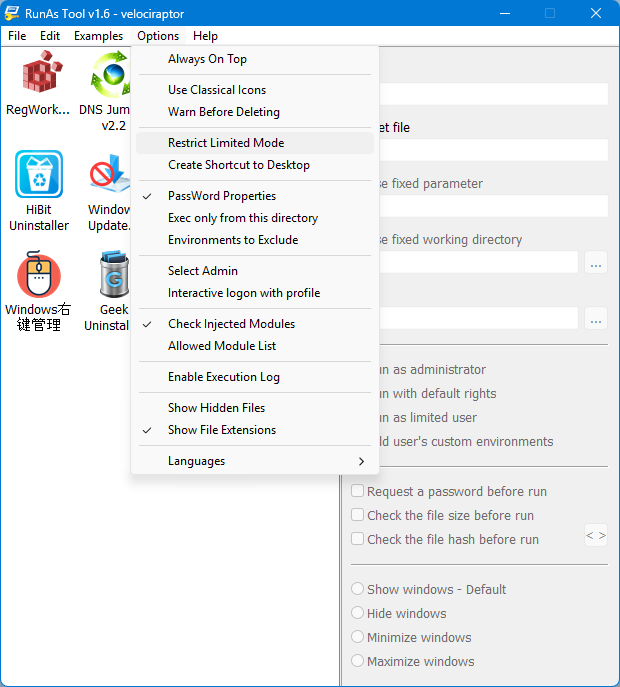
The Options menu contains many useful features, such as restricting Limited Mode, creating application shortcuts on the desktop, and adding a DLL file to the Allowed Module list.
Administrators can also easily import and export program lists. Just click File–>Menu and choose Import or Export. This is useful to create a list once and use it again later.
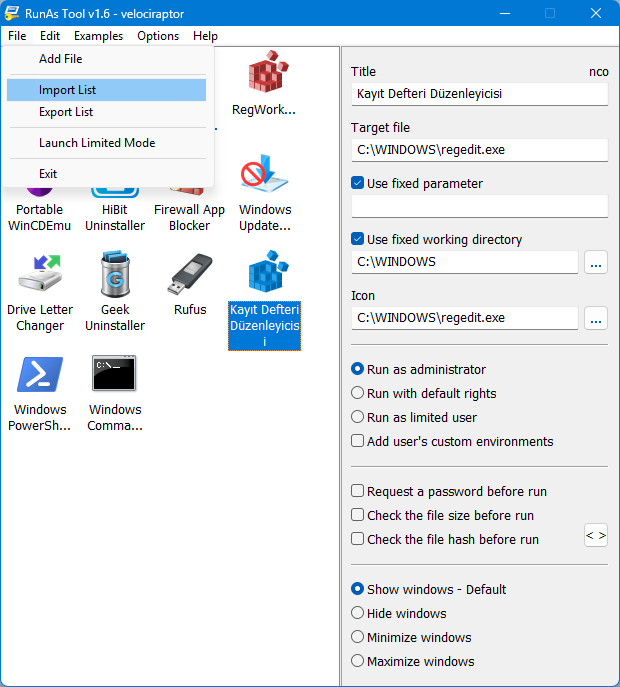
Standard users have two options to use an allowed program(s) with admin privileges.
1) In the RunAsTool restricted UI, double-click any program to run it with admin rights.
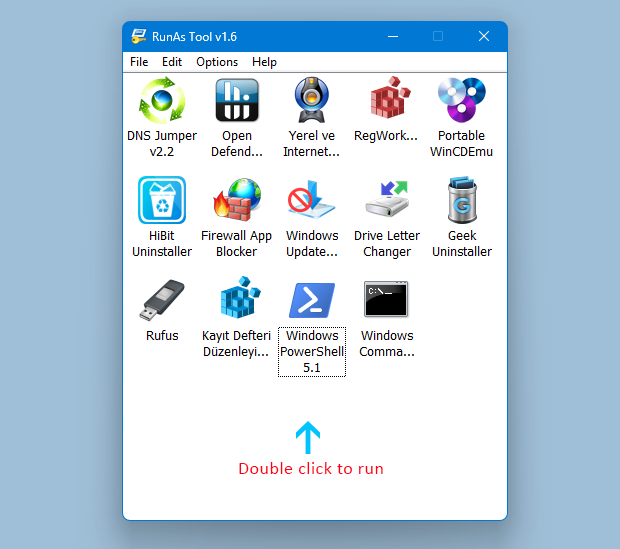
2) If the administrator has allowed it, a standard user may click any program and create their own shortcuts, so that there is no need to launch RunAsTool every time. They can also use any shortcut which the admin has already created for them. RunAsTool also supports domains. You can configure your settings in your Active Directory system and access the tool via a shared folder on other Windows systems connected to the same domain.
Supported operating systems: Windows 11 , Windows 10 , Windows 8.1 ,Windows 8 , Windows 7 , Windows Vista
Supported languages: English, Turkish, German, French, Polish, Korean, Russian, Spanish, Vietnamese, Greek, Japanese, Indonesian Bahasa, Persian, Arabic, Chinese Simplified, Chinese Traditional, Hungarian, Slovenian, Czech, Hebrew, Italian, Portuguese (BR), Dutch, Romanian, Portuguese, Catalan, Lithuanian

File: RunAsTool_x64.exe │ Virustotal
MD5: 32f05522749f93b52436d2947912a911
SHA1: 7930d2ee7eeec17ec79aa5c579979975c1fe50f4
File: RunAsTool.exe │ Virustotal
MD5: 25a1099d786dc05d15ad221816828354
SHA1: d22394a7f3c4842ee418943a551783dadcd1b32d




 Show My IP Address
 Google Translate
Sorry but we don’t answer questions about our software security and Passwords
Hello, I discover with great interest your software and I like it very much!
However, I have two questions:
-I’m wondering about security, where is the administrator password stored?
If I understood correctly, in the registry, but where exactly is it stored?
I intend to use it for my own use, but I’m afraid that if ever an attack occurs on my machine, it will be compromised if the attacker finds my password?
-when opening a shortcut, we are challenged by the UAC (just click on "Yes"), is it possible to bypass this request without totally disabling the UAC?
I tried a lot of things to bypass this request but I can’t do it.
Thank you very much for this software!
how to run uninstallation from "add & remove/Program features" ? when I try to run the appwiz.cpl application through runas still it asks for admin rights.
Há possibilidade de colocar um atalho para um instalador? alguns softwares do governo não atualizam e é necessário executar um novo setup.exe
It would be really cool if domain accounts can be added to this tool. This way accounts that need access to domain resources (UNC paths) are able to use this tool.
Cheers
The amount of adverts on this page for false download links really makes me nervous about using this product.
There is no Domain Admin support , Sorry.
I have installed locally on my laptop the Active Directory Users and Computers app and I want to run it with my Domain Admin account. Will it work?
RunAsTool v1.4 has no network support , sorry
I want to run de rnt file in the script over the network. now I’m do this with de local administrator, Is there an solution to use a domainadminaccount?
Thanks for your comment
The best app to run programs as admin with a guest account. I used this to run a mouse macro program as admin on guest accounts.
Sorry there is no Network support
Hello,
my software is on a server (\\ filer \ info \ software).
How to proceed so that the users have access to the software via runastool?
I do not see how
Bonjour,
mes logiciel sont sur un serveur (\\filer\info\logiciel).
Comment procéder pour que les utilisateurs aient accès au logiciel via runastool?
je ne vois pas comment faire
Thanks run as tool developer.
It’s very useful tool. already we hve many type and method try but all method are unsuccessful.
thanks for future.
Sorry but No.