
PowerRun is a portable freeware to launch regedit.exe , Cmd.exe or other software with the same privileges as the TrustedInstaller / Nt Authority/system Why would you need it? Sometimes it is not enough to just be running as Administrator, Maybe it’s a file or a registry key that is locked or not editable, PowerRun a tool with this powerful privilege most likely solve that , PowerRun doesn’t require any installation process or additional dll files.
What is New (Wednesday, July 15, 2026)
2. [Added] – Code Improvements.
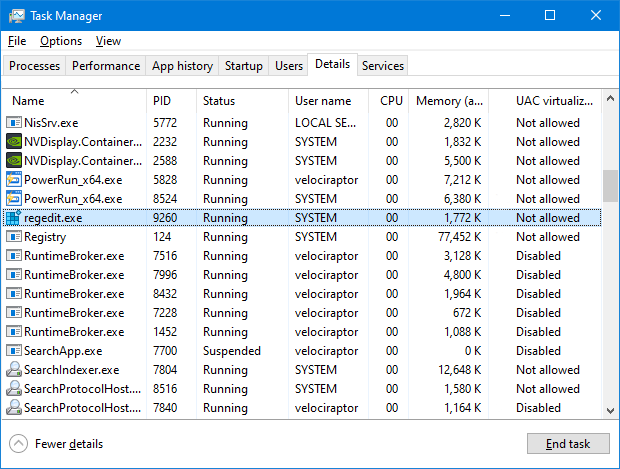
How to use : After downloading, extract PowerRun to your desired location, then run it. You can drag and drop any files on it for example ; program files , Program files shortcuts , script files , text files usw. to run a listed file in TrustedInstaller/SYSTEM privileges you can select it and use run button or right click on it and choose “Run File” feature , the file will run with Highest privileges , you can check the Task manager’s details tab to verify that the selected file running under SYSTEM Privileges.
If you’re trying to edit or delete keys from the registry , you might find that some keys won’t let you do anything with them and you’ll get an error such as “Cannot delete xxxxx: Error while deleting key“. These keys are usually protected to stop accidental deletion , You could also be the administrator on the computer, but still can’t manipulate the required key.
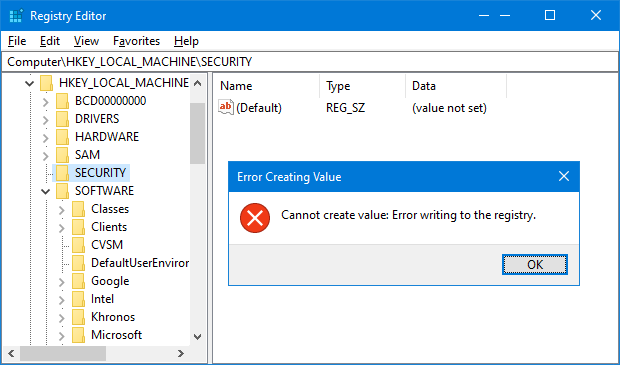
Even though the administrator account has a great deal of control, there are other hidden accounts and levels on the system which have even greater access and therefore standard administrator privileges are not enough. To solve this problem, you have to force the registry to allow the logged on user full control of the subkeys in such cases PoweRun can help you : use the “Launch Registry Editor” button.
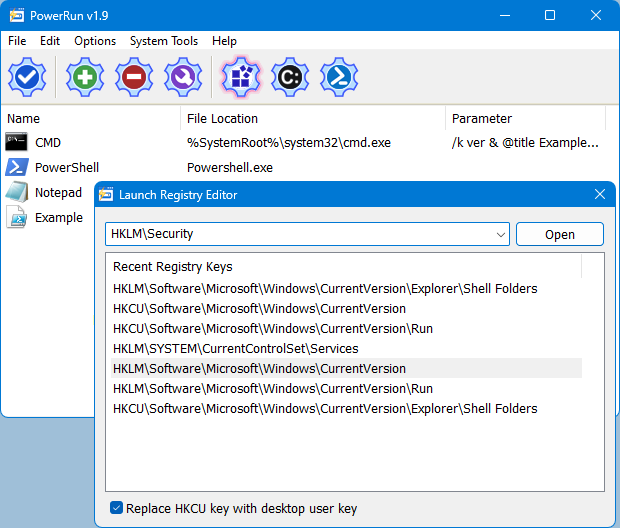
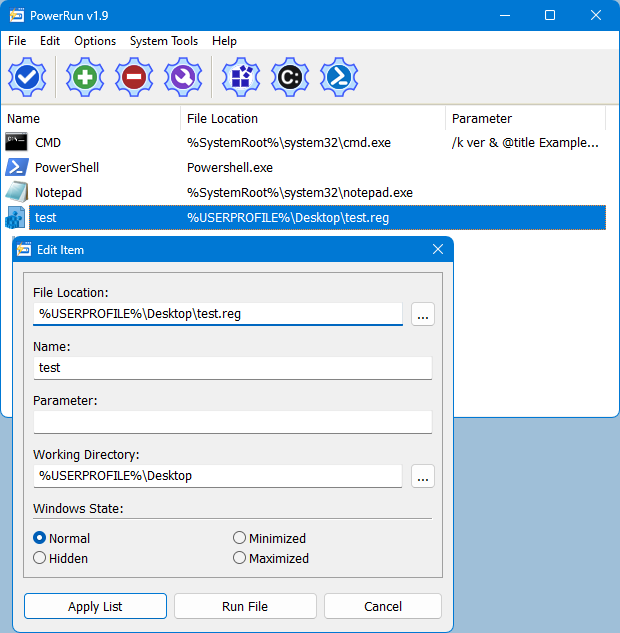
Copy desired registry key and click “Open” button , PowerRun will open regedit (with Highest Privileges) and jump to the key Automatically. If you want to add any parameter to listed script or program rigt click on it and use “Edit Item” or just use wrench Button.
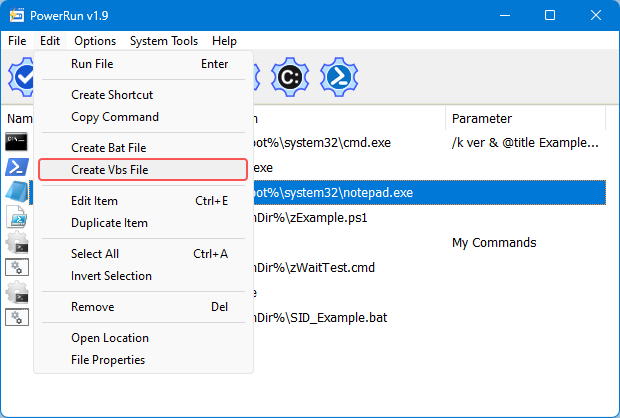
For automation purpose PowerRun allows you to create a vbs or bat file with necessary parameters in it , to use this feature :
1. Select the Program.
2. And use Edit – Create bat/Vbs File feature.
Don’t forget to run the script in the same folder with PowerRun.exe or PowerRun_x64.exe.
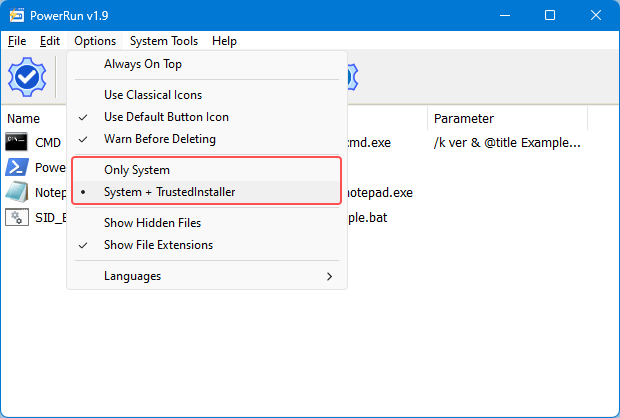
Choosing between System or TrustedInstaller Privileges
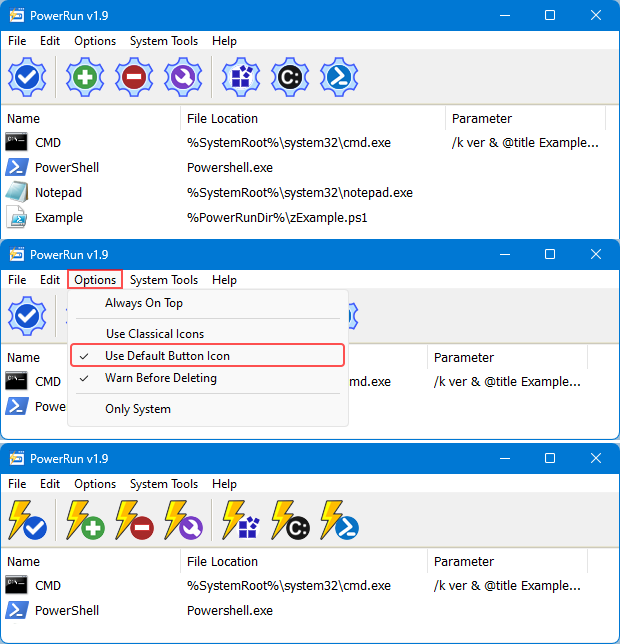
In the Options menu, you can choose between System and System + TrustedINstaller permissions.
To see all supported command line parameters of PowerRun, use PowerRun.exe ? command or click File menu and select Command Line Info.
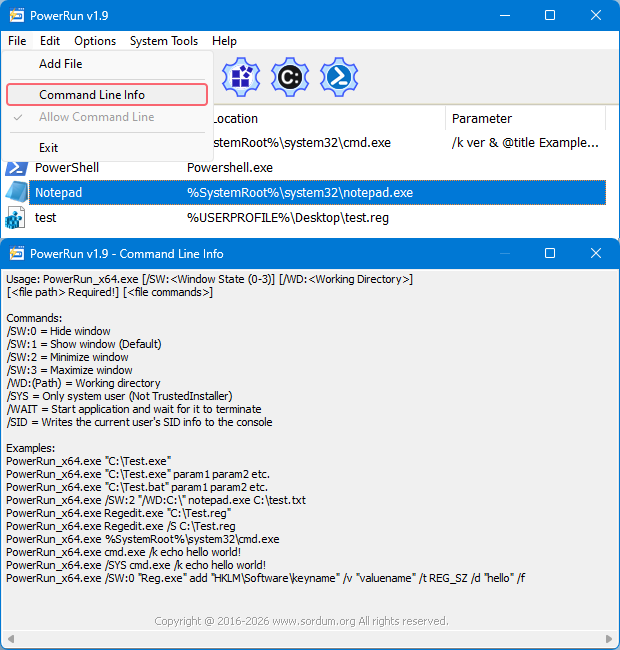
NOTE: PowerRun can not run only with “TrustedInstaller” privileges it can also run with “Nt Authority/system” privileges.
Supported operating systems: Windows 11 , Windows 10 , Windows 8.1 , Windows 8 and Windows 7
Supported languages: English , Turkish , German , Portuguese (Brazil) , Korean , French , Greek , Russian , Japanese , Polish , Spanish , Chinese (Simplified), Lithuanian, Italian, Vietnamese, Dutch (Nederlands)


File: PowerRun_x64.exe │ Virustotal
MD5: 8177df010460984de0df608483531103
SHA1: 4f4b009bdad5c97317492058267d51a4d3fde21a
SHA-256: b305126c2881073a53073bd1782d0649764d198562e02fc02395fc07637dcec5
File: PowerRun.exe │ Virustotal
MD5: 4dd8405238b8b3df3e8a663b98f064e0
SHA1: 24e0fa7565d006fa44ec7c243c416997e3b1a011
SHA-256: 4b2f1f74f33706ff4f1103495134670ff9fac88cb672bf2524d02f8405f14fb5




 Show My IP Address
 Google Translate
On Windows 7 RTM (no SP1) PowerRun executes only as the NT AUTHORITY/SYSTEM despite the entry: TrustedInstaller=1 being present in the [Main] section of the PowerRun.ini.
What service does PowerRun need to install to work properly?
Hebrew language added , thank you
Download file Hebrew has been fixed
Thanks but can’t download your file because of the permission problem
Hebrew translation By MilleR_DaNi
Powerrun need to install a service to work properly, if you started offline system you don’t need powerrun or any other tool to edit your system files , just do it. I recommend you to use DISM command to repair your windows properly , just use following command (You need an extracted windows 10 ISO file and it must be the same version)
Dism /Online /Cleanup-Image /RestoreHealth /Source:wim:E:\sources\install.wim:1 /limitaccess
NOTE: If you extract windos ISO to your USB-Stick and for example your USB-Stick letter is H then change the command like this
…. /Source:wim:H:\sources\install.wim:1 /limitaccess
I have some trouble with my registry (WIN10 did not start). Start with USB-Stick to fix it but powerrun did not work. Message “Sec Logon Service does not exist”.
What can I do ?
PoweRun: DCOMperm “is not recognized as an internal or external command??
Any idea how to run DSC under TrustedInstaller? Can DSC execute PowerRun?
Now I can’t revert again some Windows Services like Windows Update and Windows Update Medic Service that I changed previously executing service.msc as TrustedInstaller. It says “Access Denied”. Strange. Otherwise very good program.
Please adding autorun some programs (checkboxes in list) at Windows startup feature.
Thanks very much for your great tool.
anyone tried launching explorer.exe (Windows Explorer) with PowerRun?
Create script/batch for PowerRun .exe .cmd .bat .reg submenu registration for System and Trusted Installer execution
Thank you yes , (Teşekürler evet)
I downloaded 3 programs from different places before I try PowerRun v1.3 non of them worked Thank you, I will test sordum’s other software too . do you write some programs yourself?
(PowerRun v1.3 den önce farklı yerlerden 3 program indirip denedim olmadı 3 saat uğraştım. bu programla 1 dk sürdü. sitedeki diğer programları da inceliycem.
bu programları ve sitedeki bazı programları siz mi yazıyorsunuz acaba? başarılar
teşekkürler)
Hi Keith next version we may separate System and Trustedinstaller and can give users a choice , thanks for your comment
How (or are) privileges specified? Is it a shoot from the hip? I was hoping to force trustedinstaller as my system is all over the map on registry permissions. TrustedInstaller is the only one to cover 98% of the install. No wonder I got over 800 warnings.